
This article I will go through fixing a bug I found step by step while explaining the process.
ACT I: THE BUG
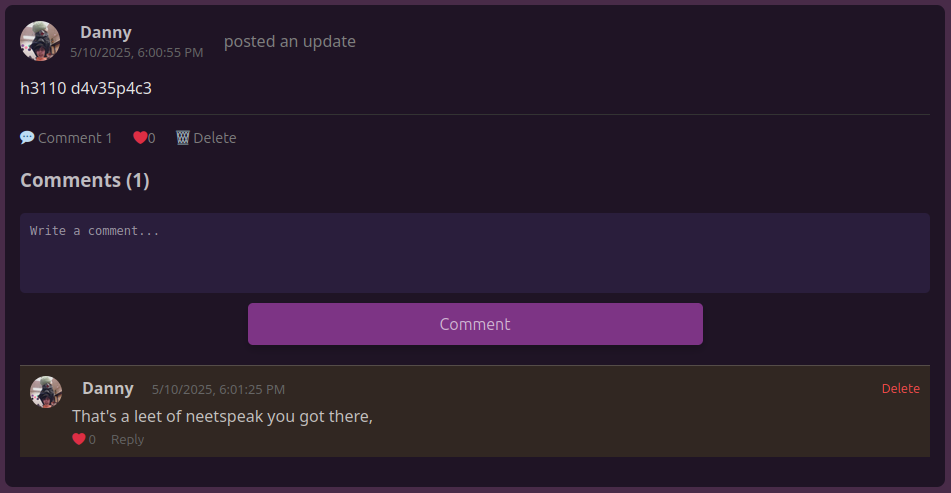
We all know that when you look at a post, it has the posters username and profile picture above it, that’s normal. Most of the time you’re also able to click it to see their profile page, this is how it behaves on the davespace remake and the original. But there is ONE small problem… This doesn’t work the same for comments. Let’s use the following post as an example:
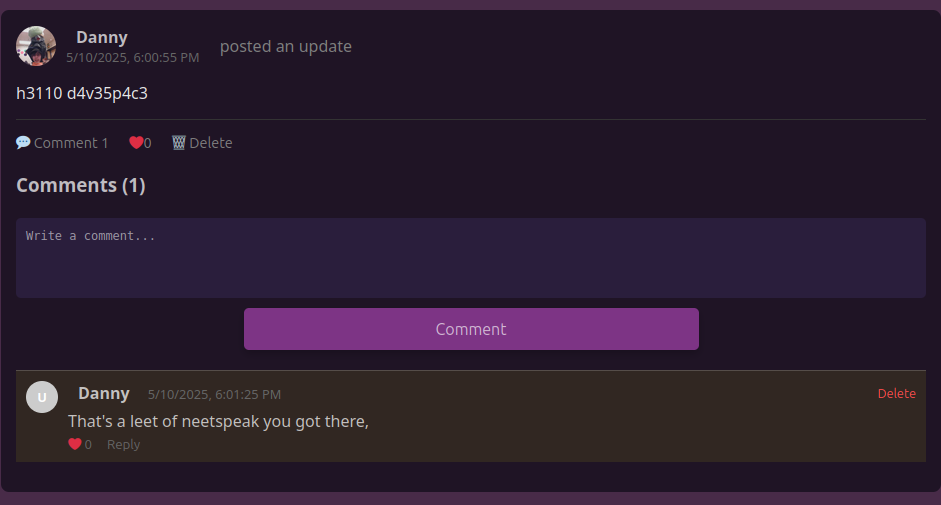
Aside from the hilarious double pun, what stands out about it? Based on what I said earlier, you might point out the profile picture on the comment isn’t there even though the post and the comment were made by the same user, and that’s right! Another problem that you can’t notice in an image is the name – you can’t click on it, it’s regular text. Now that we’ve chosen our challenger, let’s get to patching.
ACT II: TAKING THE QUICK WIN
Although both our issues are of somewhat equal importance, making the username clickable is much easier to do so we’ll get that out of the way first. Here’s the code section that displays the name on comments:
On the second line we see that it writes the display name in the given comment, if there’s no display name it uses their username. We need it to link to /profile/username (username being the user you clicked on). This is pretty easy, we just surround the first <span> with a <Link> that takes us where we want to go.

Along with a little bit of styling that’s everything we need, let’s test it out:
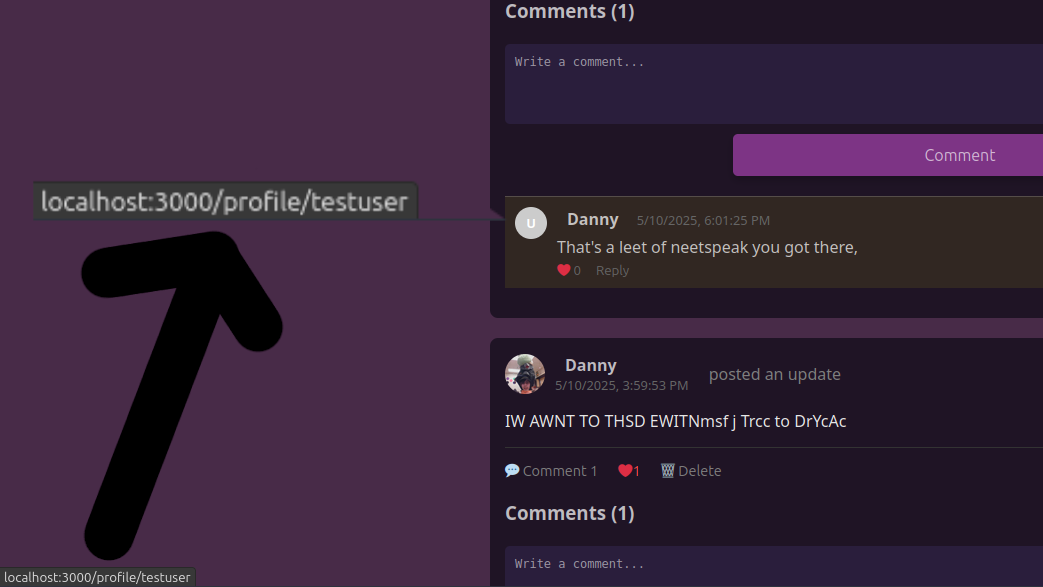
That’s fixed! But there’s still the issue with the profile picture that I’ve been avoiding.
ACT III: DEFINE:”PROBLEM”
First let’s look at where the comment decides to get the username from. In the comment component we have this section:
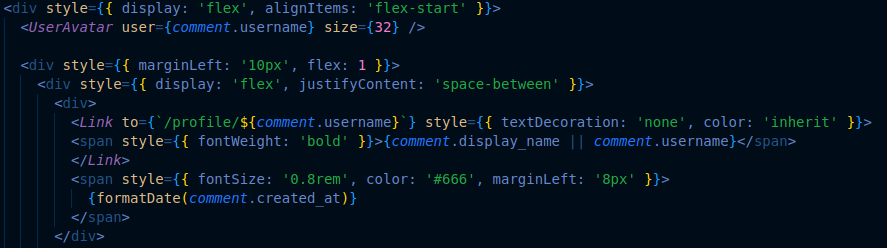
My first thought is why is <UserAvatar> is taking the comment.property as an input, it should take a user object (something that contains multiple piece of information about a specific user). So the problem is we’re giving <UserAvatar> the wrong information. Now what can be done to fix this?
ACT IV: WHEN SKINNING A CAT, KNOW YOUR METHOD BEFOREHAND.
Here’s are some solutions I brainstormed to address the issue:
- Replace user properties in the comment object with a user object that contains all of them.
- Pros:
- Pretty easy
- Won’t involve more requests to the server
- Cons:
- I’ll have to go through the code to change anything relying on the old method
- Pros:
- Give <
UserAvatar> the ability to get profile pictures from usernames- Pros:
- Slightly harder, but still easy
- Gives <
UserAvatar> more functionality - Fixes the problem without needing to change code outside of <
UserAvatar>
- Cons:
- It’s more of a workaround
- Requires another server request even if the account doesn’t have a profile picture
- Pros:
Given how I’m already happy with <UserAvatar> works, I’ll go with the first option.
ACT V: LET’S SETTLE THIS SERVER-SIDE
The comment information is given to the client by the server while loading the comments, this means I’ll have to change what’s sent to the client to fix the bug.
This is the API call that gets the comments for a given post:

We only care about the first part, it tells us that /api/comments/post/ isn’t returning a user object, just select information on the commenter. Now we know where in the server is giving back the incorrectly structured data, we can now change what it’s giving. Here is part of the server-side code that handles that endpoint:
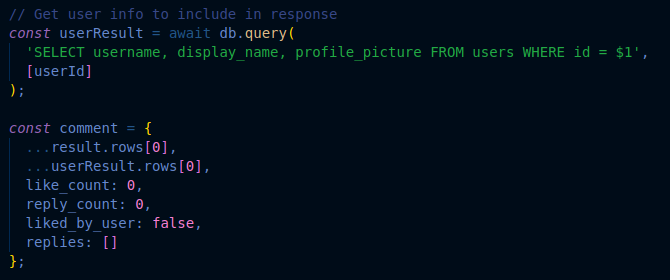
To fix it we just change how comment stores the user information, right now it adds …userResult.rows[0] to the client. The three dots splits each entry in an array to stand by itself, but we want the user information to be contained within a user object, so let’s add one and move the values to there.
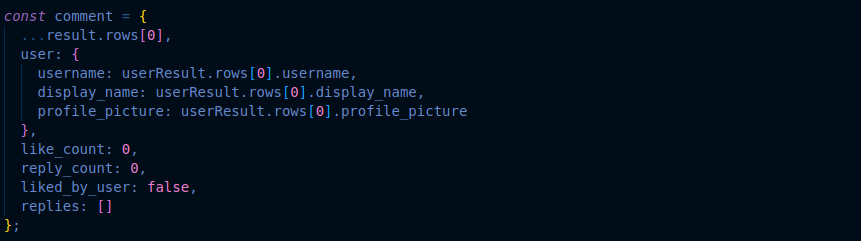
Now when loading comments we can grab information about the user much easier by having the values structured the same as users in other spots, but there’s one more thing before the bug is fixed. Now everything should work properly!
ACT VI: POLISH
Now everything should work properly!
Danny
That was wrong. After writing that I tested it and it did not work, and I realized I only changed one instance of the comment being in the wrong structure. There was also a typo, I set the picture to profile_picture when it should be profilePicture for <UserAvatar> to read it properly. After fixing consistency issues and the typo I tested and It all worked properly!
ACT VII: CONCLUSION?
I haven’t learned much fixing this bug, it was mainly utilizing debugging skills that I already had from past experiences. This was definitely a fun bug that didn’t take very long to fix. I hope you enjoyed the read and didn’t get too confused!
DAVESPACE WILL SOON BE REBORN